 Bouncer Docs
Attribution Engine
Track which ads drive your WhatsApp conversations
The Attribution Engine lets you track where your WhatsApp contacts come from when using non-Meta advertising platforms like TikTok, Google, Twitter, LinkedIn, or YouTube.
Access Attribution from Chat in the sidebar, then select the Attribution tab from the view switcher, or go directly to app.bouncer.my/dashboard/chat?view=attribution.
To create your first rule, select a WhatsApp instance from the dropdown and click Add Rule. Rules are configured per instance, so each WhatsApp number can have its own set of attribution rules.
Meta vs. non-Meta attribution
Meta ads (Facebook & Instagram) - Attribution works automatically. When someone clicks your Click-to-WhatsApp ad, Meta sends tracking data through the Cloud API. No setup required.
Non-Meta ads (TikTok, Google, etc.) - You need to create attribution rules. These platforms don't send tracking data, so Bouncer matches the pre-filled message text to identify the source.
Visual source indicators
Once contacts are attributed, the Team Inbox shows their source with a colored ring around the conversation avatar:
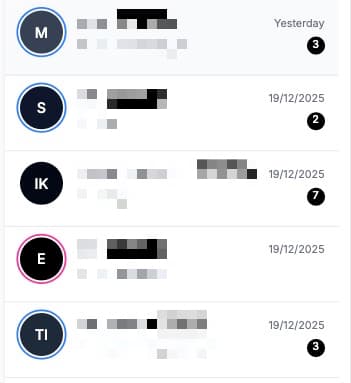
Each platform has a distinct color, making it easy to spot where conversations originated at a glance. This helps you prioritize responses based on lead source or quickly identify which campaigns are generating engagement.
How it works
When someone clicks a wa.me link from your ad, they land in WhatsApp with a pre-filled message. The Attribution Engine matches that message against your rules and records which ad brought them in.
For example, if your TikTok ad uses a wa.me link with the pre-filled text "Hi, I saw your TikTok ad!", you create a rule that matches "TikTok ad" and attributes those contacts to your TikTok campaign.
Why this matters
Meta ads (Facebook and Instagram) automatically track attribution through the Cloud API. But when you run ads on TikTok, Google, or other platforms, you lose visibility into which campaigns drive results.
With attribution rules, you can:
- Track ROI across platforms - Know which TikTok, Google, or YouTube ads generate the most conversations
- Compare ad performance - See which campaign variants drive more engagement
- Optimize ad spend - Double down on ads that actually convert to conversations
Dashboard stats
The Attribution view shows three key metrics for the last 7 days:
- Click-to-Chat Contacts - Total contacts who arrived via wa.me links
- Matched by Rules - Contacts attributed to a specific source/ad
- Unmatched - Contacts where no rule matched (source unknown)
Each rule in the table shows how many contacts it matched in the last 7 days.
Backfilling historical data
Already have contacts that arrived before you created rules? Use the backfill feature:
- Preview Backfill - See how many contacts would be updated without making changes
- Run Backfill - Apply rules to contacts from the last 7 days
The backfill processes up to 500 contacts and only updates those without existing attribution data.
Viewing attribution data
Once contacts are attributed, you'll see their source in:
- Contact Info Panel - Shows acquisition source under the Info tab
- Analytics - Acquisition Source chart breaks down contacts by platform
- Pipeline - Filter deals by where the lead came from
Meta ads vs. Attribution Engine
| Feature | Meta Cloud API | Attribution Engine |
|---|---|---|
| Platforms | Facebook, Instagram only | TikTok, Google, Twitter, LinkedIn, YouTube, Custom |
| Tracking method | Automatic via CTWA Click ID | Pattern matching on pre-filled text |
| Setup required | None - just enable Cloud API | Create rules for each ad campaign |
| Ad-level tracking | Full campaign/ad set/ad details | What you define in your rules |
| Visual indicator | Colored ring on avatar | Colored ring on avatar |
Both methods work together and display the same visual indicators in the Team Inbox. Meta ads are tracked automatically with zero configuration; the Attribution Engine fills the gap for every other platform.